






- Top >
- ITC Account >
Faculty and Staff
UserID Naming Policies
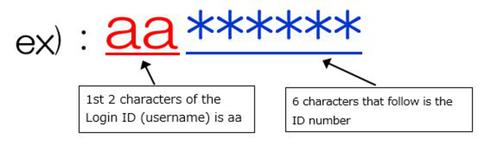
The ITC account consists of 8 characters.
The first 2 characters are “aa” and the 6 characters that follow is the ID number.
The first 2 characters may be changed to letters other than “aa”.
How to Apply for an ITC Account
Issue of Account
Application for an account will be accepted at Keio Information Technology Center office on your campus.
※Please bring an identification (drivers license, Keio University ID Card, residence card or individual number card etc.).
*Individual Number Card: Please present only the front side of the card.
Reception Hours of keio Information Technology Center Office on each Campus
Main Services Provided
| Service | Content |
| PC | Use of KIC PCs on Campus |
| Storage Capacity | My Document Storage of 3GB |
| Network with Authentication | Access to Wireless/Wired LAN |
| Personal Webpage (Fee-Based) | Posting of Personal Webpage (to be separately applied for) |
| Unix Login (Fee-Based) | Use of the Unix Environment (to be separately applied for) |
- Users must be authenticated with the Keio ID for network access (wireless and wired LAN)
Last-Modified: December 23, 2025
The content ends at this position.